Amazon Product Research: How to Find Products to Sell
Amazon product research step by step: check demand, price, competition and who sells a product, find the products around it and build a shortlist.
Amazon product research means finding products that sell steadily on Amazon and still leave room for you. Start from a product or category you know, look at the products around it, then check each one’s Best Sellers Rank, price, reviews, number of sellers and who holds the Featured Offer. Keep the ones with steady demand and competition you can match.
Two ways to sell, two kinds of research
What you look for depends on how you sell:
- Reselling (wholesale, online or retail arbitrage): you sell an existing product on its existing ASIN, next to other sellers. You research ASINs and their sellers: how many sellers there are, who holds the Featured Offer and at what price.
- Your own brand (private label): you create a new product page. You research niches and categories: how much the leading products sell, how many reviews they have and what buyers complain about.
The steps below work for both. Skip what does not apply to you.
What to check on every product
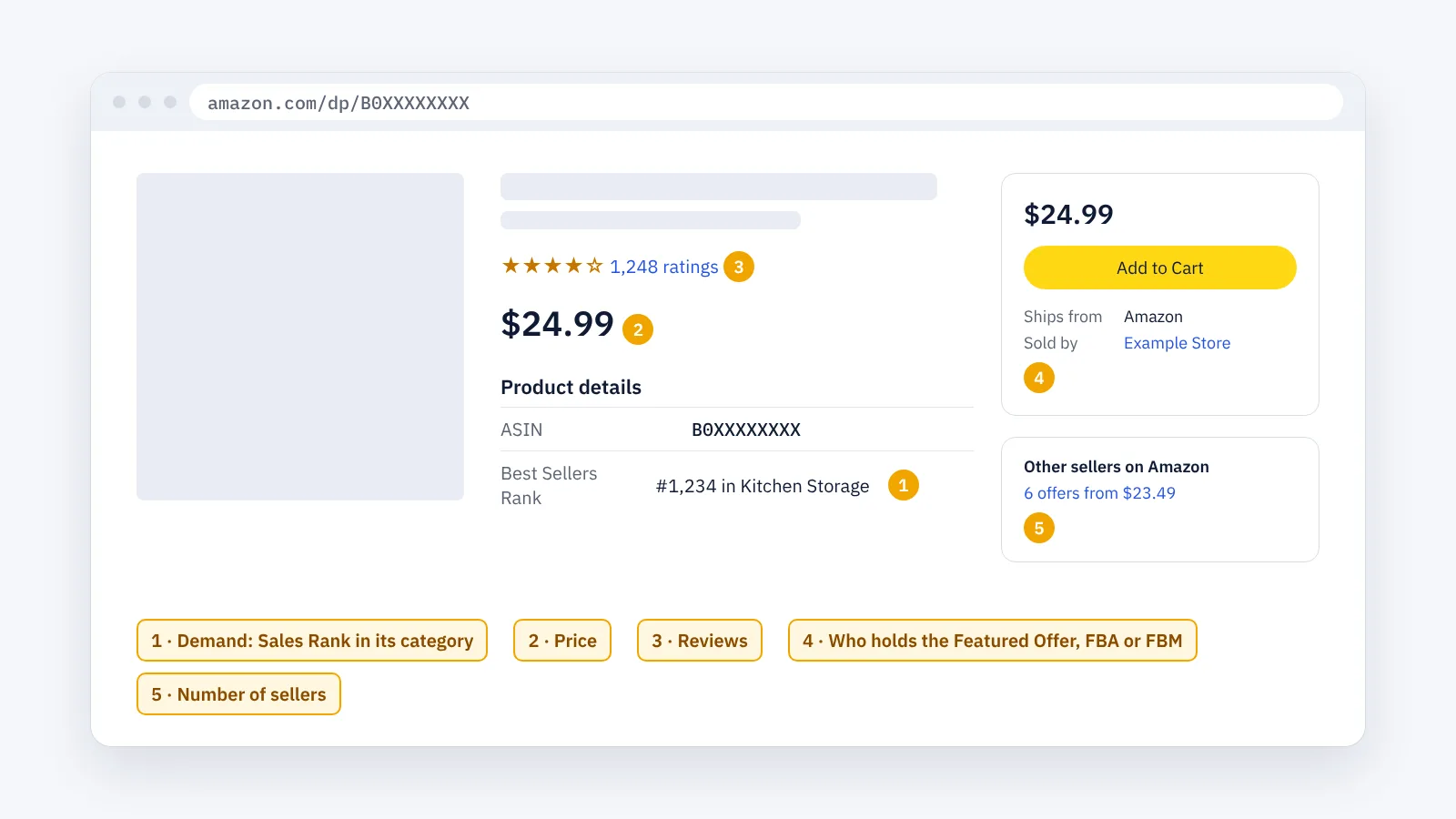
- Demand: the Best Sellers Rank in the product details. A lower number means more sales, but only compared with products in the same category. It changes during the day, so check it more than once (how to read the Amazon Sales Rank).
- Price: what is left after Amazon’s fees and your own cost. Amazon’s Revenue Calculator shows the fees for a product.
- Reviews: how many and how good. Many strong reviews make it harder for a new product page to compete; for a reseller they show a product people trust.
- The Featured Offer: the offer in the buy box, and whether it ships from Amazon (FBA) or from the seller (FBM). If Amazon itself sells the product, winning the Featured Offer is usually hard (what the Buy Box is).
- Number of sellers: Other sellers on Amazon. More sellers means the sales are shared among more offers.
Also check whether the category or the brand needs Amazon’s approval before you can sell it. You see this in Seller Central when you try to add the product.
Step by step
Step 1 · Start from what you know
Pick a product you already sell, or one from a category you understand. Note its ASIN: what an ASIN is and how to find it.
Step 2 · Find the products around it
Open the product’s most specific category, the last one in the category path at the top of the page. Its products are your product’s closest neighbours. The full method is in ASIN research: how to find related products.
Amazon’s Best Sellers pages show the top products of each category too. Remember that the top products are usually the most competitive ones.
Step 3 · Check each product
For each product worth a closer look, note the five checks above in one spreadsheet: ASIN, Sales Rank, price, reviews, Featured Offer, fulfillment and number of sellers.
Step 4 · Look at who sells it
Click the seller’s name in the buy box or in Other sellers on Amazon. The seller’s page links to its storefront, where you see the other products it sells. A seller who does well with one of your products often sells more products you can research.
Step 5 · Do the numbers
For the products left on your list, work out the margin: price, minus Amazon’s fees, minus your cost and shipping. Drop the ones that leave too little.
Step 6 · Check again before you buy
Sales Rank, prices and sellers change. Look at your shortlist again over a few days before you order stock.
The faster way: product research with ENSKOM
Doing this by hand means opening hundreds of product pages. ENSKOM is a Chrome extension that does the reading in your own browser:
- ASIN Researcher: start from your ASINs and get the products in their exact categories, graded Very Strong, Strong or Related.
- Detailed Research: for the products you select, collect the current price, sellers, Featured Offer, fulfillment (FBA or FBM) and Sales Rank, as Amazon shows them. A value Amazon does not show is marked Unknown, never guessed.
- Seller Discovery and Store Scans (Store Researcher): find the sellers behind your ASINs and collect the products in their storefronts.
- Export: copy the ASINs or export them to CSV or Excel for your own calculations.
The Free plan includes every research feature.
Guides: Start a new research · Detailed Research · Seller Discovery
Tips
- Compare within one category. A Sales Rank means little next to a product from another category.
- Research the marketplace you sell in. Prices, ranks and sellers differ between marketplaces.
- Look for steady products, not spikes. A product that ranks well for one day may be a seasonal or one-off peak.
- Keep your list. Products you drop today may be worth another look in a few months.
FAQ
What is a good Best Sellers Rank?
There is no single number. It depends on the category: the same rank means very different sales in a large category and in a small one. Compare products within the same category and check over several days.
How many sellers is too many?
There is no fixed limit. With more sellers, the Featured Offer is shared among more offers and each seller gets a smaller part of the sales. Price, fulfillment and stock all affect who gets it.
Do I need a seller account for product research?
No. Product research uses the public product pages anyone can open. You need a seller account to check whether you are allowed to sell a product.
Is a product on Amazon’s Best Sellers list a good product to sell?
Not by itself. Those products sell a lot, but they usually also have the most competition. Check the sellers, the reviews and your margin first.
What is reverse sourcing?
Reverse sourcing starts on Amazon: you find a product that sells well, then look for the same product at a wholesaler or a shop where you can buy it for less. Product research is how you choose which products to look for.
Can I research several Amazon marketplaces?
Yes, but research each one separately: the same product can have a different price, rank and sellers in each marketplace. ENSKOM works in 21 Amazon marketplaces.