Install ENSKOM in Chrome.
ENSKOM works as a Chrome extension. Setting it up takes about five minutes, once.
- 01
Create a free account
Sign up with your e-mail and a password, then confirm your e-mail. The Free plan has every research feature.
Start free - 02
Download ENSKOM
Sign in to your ENSKOM account and download the ENSKOM ZIP file on the Getting started page.
Sign in - 03
Unzip it to a permanent folder
Extract the ZIP into a folder you will keep, for example Documents\ENSKOM on Windows (right-click the ZIP, Extract All) or Documents/ENSKOM on a Mac. Chrome runs ENSKOM from this folder: never delete or move it.
- 04
Load it in Chrome
Type chrome://extensions in the address bar. Turn on Developer mode at the top right, click Load unpacked and choose the ENSKOM folder.


- 05
Pin ENSKOM and sign in
Click the puzzle icon next to the address bar and pin ENSKOM. Open it and sign in with the same e-mail as your account.
Updating ENSKOM
When ENSKOM shows that an update is available:
- Download the new ZIP on Getting started in your ENSKOM account.
- Extract it and copy its files over the same ENSKOM folder, replacing the old files.
- On chrome://extensions, press the reload button (↻) on the ENSKOM card.
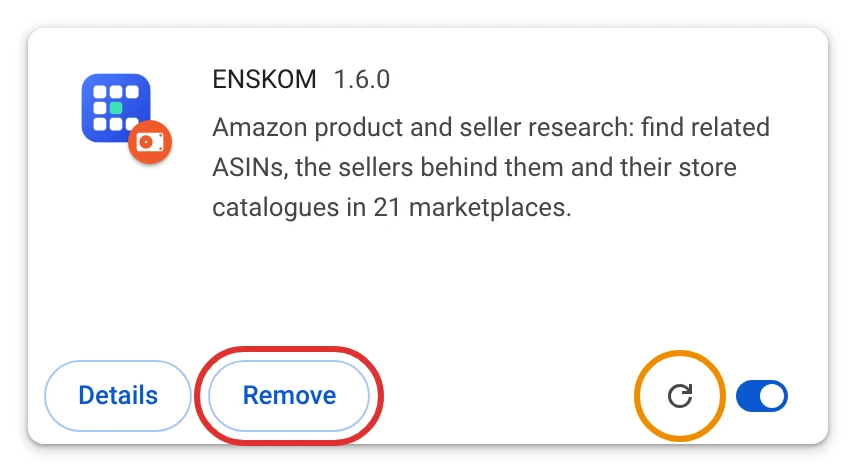
Never press Remove. Removing the extension can delete the research data stored in your browser. Updating over the same folder keeps it.
If a red notice appears right after an update, press the reload button once more.
Stuck? Write to [email protected] and a person will help.