How to Find Who Sells a Product on Amazon
See who sells a product on Amazon: the Featured Offer seller, every other seller in the offer list, FBA or FBM, and how to find sellers for many ASINs at once.
To see who sells a product on Amazon, open its product page. The seller of the Featured Offer is shown in the buy box, next to Sold by. To see every other seller, open Other sellers on Amazon or See all buying options: the offer list shows each seller with its price, the item’s condition and whether Amazon or the seller ships it.
Why sellers look up other sellers
- Wholesale sourcing: sellers who offer the products you sell are your competitors, and their storefronts show which other brands sell well.
- Pricing: you see the prices you compete with and who wins the Featured Offer.
- Competition: you see how many sellers share a product before you decide to sell it.
Step 1 · Check the buy box
On the product page, the buy box shows the offer Amazon features, with two lines:
- Ships from Amazon, Sold by a seller: the seller uses Fulfillment by Amazon (FBA).
- Ships from and Sold by the same seller: the seller ships it itself (FBM).
- Ships from and Sold by Amazon: Amazon sells the product itself.
More in FBA vs FBM. This is only the seller that is featured right now. Other sellers may offer the same product.
Step 2 · Open the offer list
Click Other sellers on Amazon, See all buying options or the number of offers under the buy box. The offer list opens. For each offer you see:
- the price and delivery cost,
- the condition (new or used),
- who ships it and who sells it,
- the seller’s rating.
Use the New filter if you only want sellers of new items, as wholesale sellers usually do.
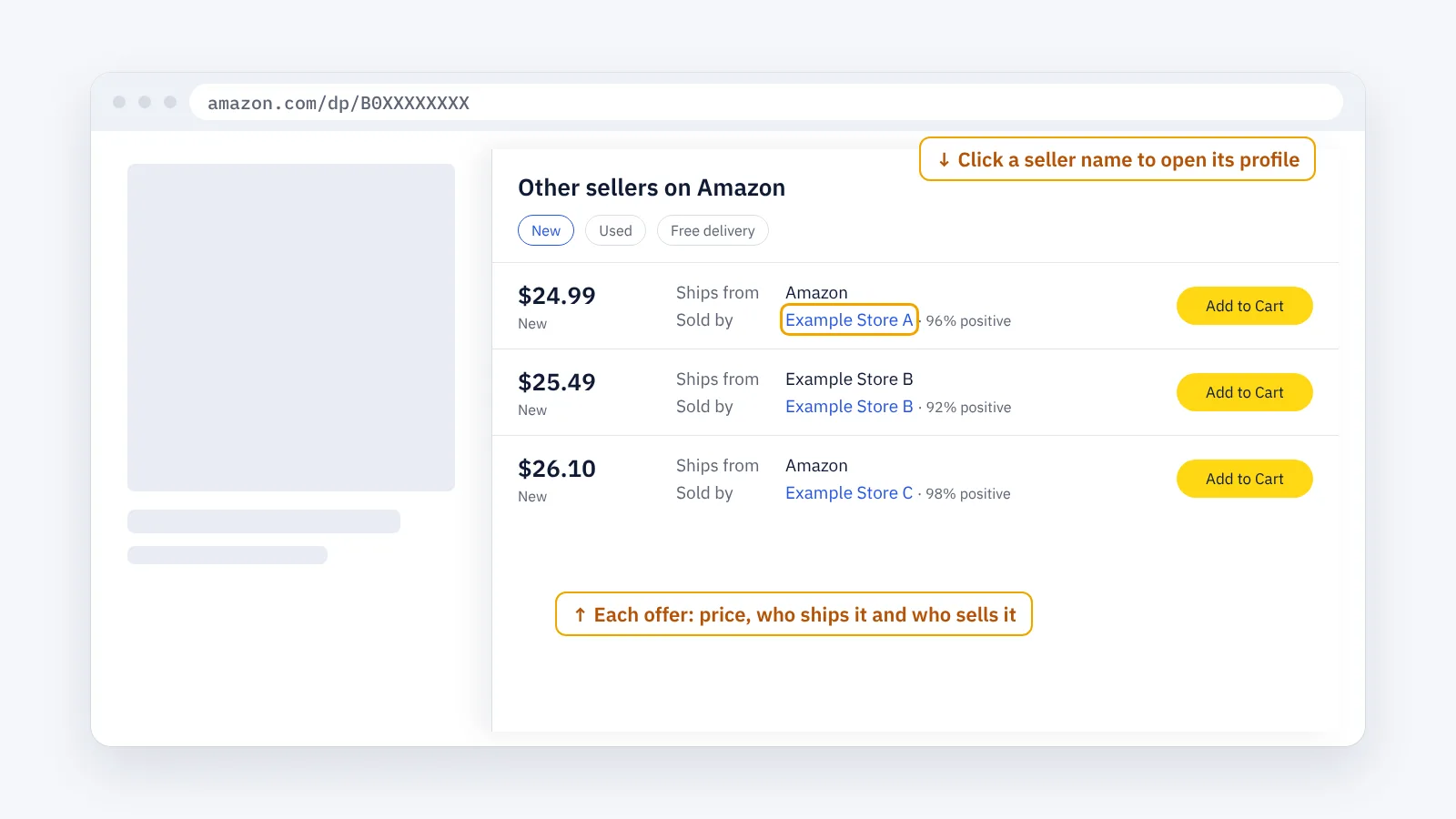
What the offer list tells you
- How crowded the product is: many offers at almost the same price means the sales are shared among many sellers.
- Whether Amazon sells it: if Amazon has its own offer, other sellers usually win the Featured Offer less often.
- How sellers fulfil it: many FBA offers mean fast delivery is the norm, and an FBM offer has to match it.
- The price range: the gap between the lowest and the highest new offer shows how much room there is.
Step 3 · Open each seller’s profile
Click a seller’s name. Its profile shows the ratings and, for many sellers, the business name and address. From there you can open the seller’s storefront and see its other products: how to find all products sold by an Amazon seller.
Note the seller ID too. It is in the profile’s address after seller=, and it identifies the seller even when its display name changes.
Step 4 · Repeat for your list
Do the same for every product you research and keep one spreadsheet: ASIN, seller name, seller ID, price, FBA or FBM. Sellers who appear on many of your ASINs are the ones active in your niche.
Things to know:
- The offer list changes. Sellers who run out of stock disappear and come back.
- Delivery location matters. Some offers are only shown for certain delivery addresses. Set the delivery location of the marketplace you sell in.
- Each marketplace has its own sellers. Check the same ASIN in each marketplace you research.
The faster way: Seller Discovery with ENSKOM
Opening the offer list of hundreds of products takes hours. ENSKOM’s Store Researcher does it in your own browser:
- Seller Discovery: paste a list of ASINs or import a CSV or Excel file. ENSKOM finds the sellers offering each product and records which product led to which seller.
- New sellers stand out: stores you already know are recognised by their seller ID, so you see who is new.
- Sellers: every store appears once, with the marketplaces it sells in and its business country.
- Store Scans: from the list, collect the products of the stores you choose.
The Free plan includes every research feature.
Guides: Seller Discovery · Your Sellers list · Store Scans
FAQ
Can I see how much each seller sells?
No. Amazon does not show sales per seller. You can see who offers the product, at what price and who holds the Featured Offer.
Why does the seller in the buy box change?
Amazon chooses the Featured Offer among the eligible offers, and the choice changes with price, delivery, stock and seller performance. Several sellers can share it over a day. More in what the Buy Box is.
What does “Ships from Amazon, Sold by” another seller mean?
The seller uses Fulfillment by Amazon (FBA): Amazon stores, packs and ships the item, but the seller owns the offer.
Is a seller without the Featured Offer still selling?
Yes. Its offer is in the offer list, and buyers can choose it there.
How do I find who sells a product in another Amazon marketplace?
Open the same ASIN on that marketplace’s site, for example amazon.de/dp/ followed by the ASIN. The sellers are often different.