Amazon Seller ID: What It Is and How to Find It
What an Amazon seller ID (merchant ID) is, how to find any seller’s ID from its profile or storefront, how to find your own, and what you can do with it.
An Amazon seller ID is the code Amazon gives every seller account, for example A1XXXXXXXXXXXX. It is also called the merchant ID or merchant token. To find any seller’s ID, open its seller profile and look at the address after seller=, or open its storefront and look after me=. Your own ID is in Seller Central, under your account’s business information.
What a seller ID is
- A code of letters and digits that usually starts with
A. Amazon assigns it; the seller cannot choose or change it. - It stays when the name changes. A store’s display name can change at any time; its seller ID does not. That is why the ID, not the name, is the reliable way to keep track of a seller.
- One seller, many names. Seller ID, merchant ID and merchant token all mean the same code.
- Not the marketplace ID. Storefront addresses also contain
marketplaceID=: that code names the marketplace (for example amazon.com or amazon.de), not the seller.
How to find another seller’s ID
From the seller profile
- Open a product the seller offers and click its name next to Sold by, or in the offer list (how to find who sells a product).
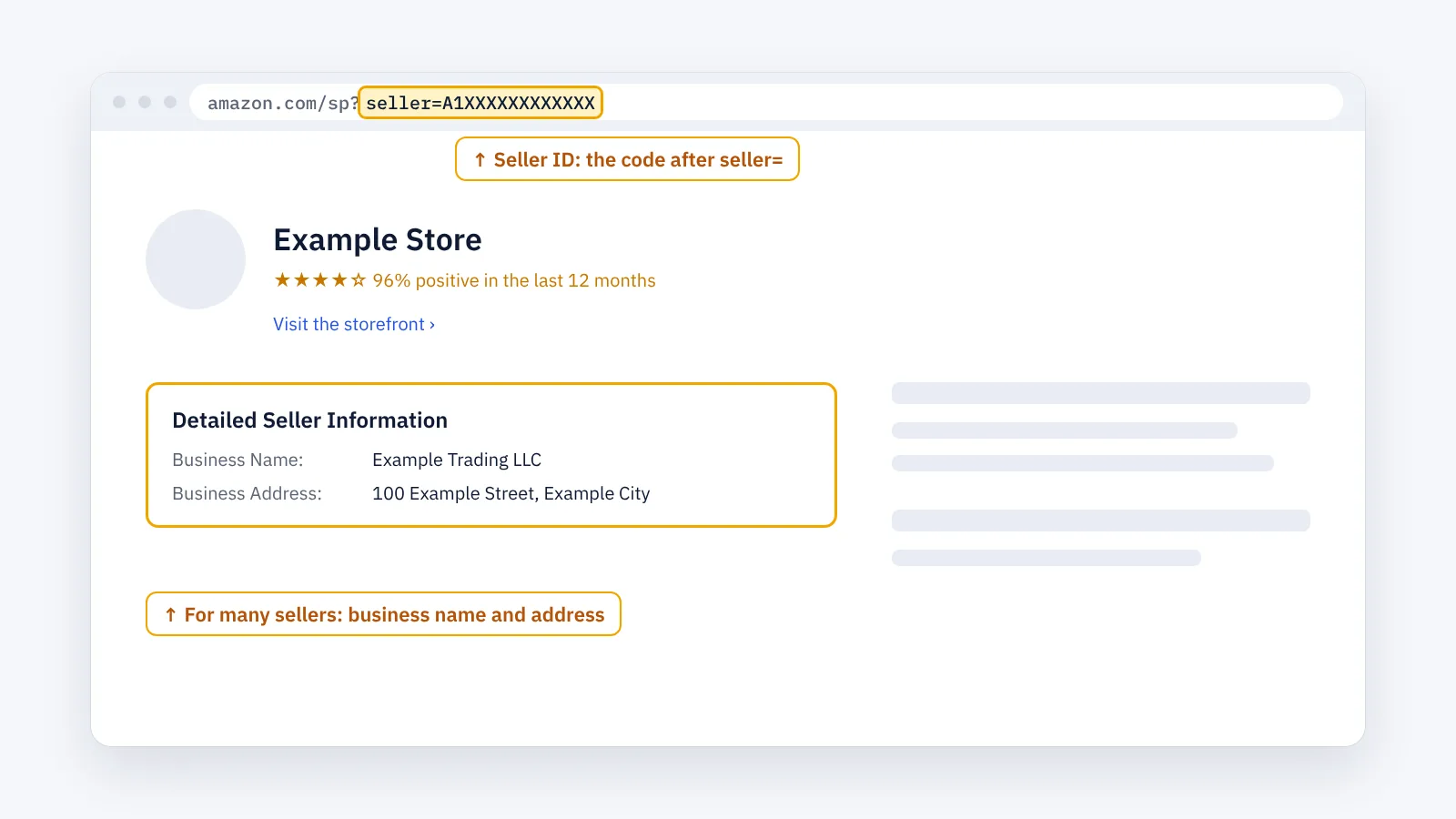
- The seller profile opens. Look at the address: the ID is the code after
seller=, up to the next&.
amazon.com/sp?seller=A1XXXXXXXXXXXX
From the storefront
From the profile, open the seller’s storefront. Its address contains the same ID after me=:
amazon.com/s?me=A1XXXXXXXXXXXX&marketplaceID=…
Codes you see in Amazon addresses
| In the address | What it is | Example |
|---|---|---|
/dp/… |
The product’s ASIN | /dp/B0XXXXXXXX |
seller=… |
The seller ID, on a seller profile | /sp?seller=A1XXXXXXXXXXXX |
me=… |
The seller ID, on a storefront | /s?me=A1XXXXXXXXXXXX |
marketplaceID=… |
The Amazon marketplace | the site, not the seller |
How to find your own seller ID
In Seller Central, open Settings, then Account Info, then Business Information, and look for Merchant Token. That code is your seller ID. You can also open your own storefront from a product you sell and read the ID from the address, as above.
What you can do with a seller ID
- Open the profile again: the marketplace address, then
/sp?seller=and the ID. - Open the storefront again: the marketplace address, then
/s?me=and the ID. This lists the seller’s products: how to find all products sold by an Amazon seller. - Keep a clean list of sellers: with the ID, a seller who renames its store is still the same row in your spreadsheet.
A seller often uses the same ID in several marketplaces, but its products, ratings and offers differ in each one. Always note the marketplace together with the ID.
The faster way: keep track of sellers with ENSKOM
ENSKOM’s Store Researcher is a Chrome extension that keeps your sellers in one place:
- A seller ID finder built in: on a seller’s page on Amazon, ENSKOM reads the seller ID from the page you are on. No copying.
- Seller Discovery: find the sellers behind a list of ASINs; stores you already know are recognised by their seller ID.
- Sellers: every store appears once, identified by its marketplace and seller ID, with the marketplaces it sells in and its business country.
- Store Scans: collect the products of any store in your list.
The Free plan includes every research feature.
Guides: Your Sellers list · Seller Discovery · Store Scans
FAQ
Is a seller ID public?
Yes. It appears in the address of every seller profile and storefront, and anyone can see it.
Can a seller change its seller ID?
No. A seller can change its display name, but the seller ID stays the same.
Amazon seller lookup: can I find a seller by name?
Amazon has no search for seller names. Find one of the seller’s products and open its profile from there.
Does Amazon show a seller’s email or phone number?
Amazon does not show sellers’ email addresses. For many sellers, the profile shows the business name and address under Detailed Seller Information.
What is the difference between the seller ID and the marketplace ID?
The seller ID names the seller. The marketplace ID names the Amazon site, such as amazon.com or amazon.de. A storefront address contains both.